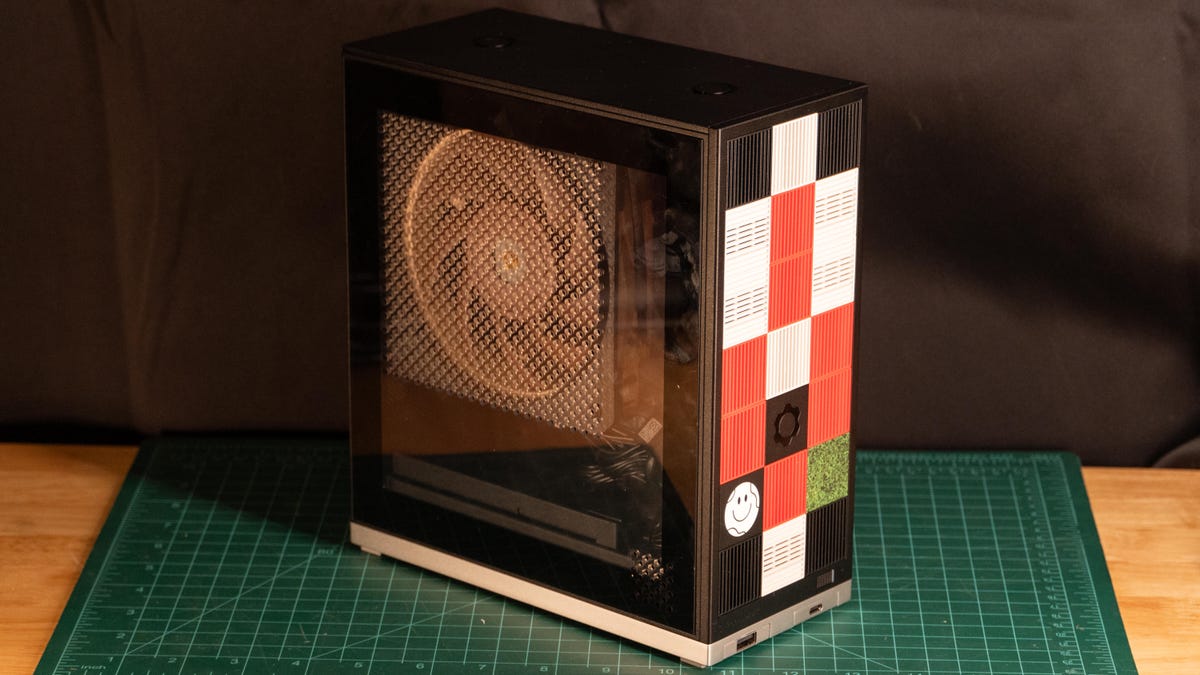
It’s funny how expectations work in the tech world. For the better part of a decade, Framework has been the undisputed darling of the “right to repair” movement, and for good reason. They didn’t just give us laptops; they gave us a manifesto wrapped in aluminum. They proved that a portable machine didn’t have to be a disposable, sealed-shut slab of glass and glue. Instead, they offered us something that felt alive—a machine you could actually own, tinker with, and grow alongside. So, naturally, when whispers of a Framework Desktop started circulating, the hype was almost suffocating. We were all expecting the company to do for the dusty, stagnant PC tower what they had already done for the notebook. But now that the Framework Desktop is finally sitting on desks, the reality is… well, it’s complicated. According to the folks over at CNET, the machine is a fascinating contradiction: a tiny 4.5-liter powerhouse that delivers staggering performance, yet somehow manages to leave a bit of that soul-stirring “Framework magic” on the cutting room floor.
When the poster child for repairability builds a box you can’t actually fix
I’ll be honest, there’s a strange cognitive dissonance that hits you when you look at this thing. On one hand, you’re staring at this squat, punchy little box that has no business being as fast as it is. It’s a marvel of engineering that can trade blows with gaming rigs three times its size. But on the other hand, you’re looking at a machine born from a company whose entire brand is built on modularity, yet they’ve gone and integrated the CPU, the GPU, and—most controversially—the RAM into a single, un-upgradable package. Doesn’t that feel like a bit of an identity crisis? It’s like buying a Swiss Army knife where the blades are welded shut. We’re living in a time where consumers are louder than ever about longevity; a 2024 Statista report pointed out that nearly 53% of global shoppers now prioritize repairability when they’re dropping hard-earned cash on electronics. Framework usually hits that nail right on the head. Here? It feels like they might have missed the board entirely.
But let’s not just write it off because it’s different. To really get why this machine is causing such a massive divide in the tech community, we have to peel back the layers and look at what’s actually happening under the hood. Because, if we’re being completely objective, the sheer performance numbers coming out of this tiny chassis are nothing short of spectacular. It’s a beast, even if it’s a beast that’s been caged in a way we didn’t expect.
AMD’s Ryzen AI Max: The chip that shouldn’t be this fast
The literal heart of the unit that CNET put through the ringer is the AMD Ryzen AI Max Plus 395. Now, I know—that name is a total mouthful. It sounds like something a marketing committee dreamed up after three too many espressos. But behind the clunky branding is some seriously heavy-duty silicon. We’re talking about a system that churned out a PCMark10 score of 8,715. Let that sink in for a second. That’s the kind of performance territory that’s usually exclusive to those massive, RGB-drenched towers that hog half your desk space and sound like a Boeing 747 preparing for takeoff. Yet, the Framework Desktop pulls this off using a single, whisper-quiet Noctua fan and a footprint that is literally smaller than your average kitchen toaster. It’s a masterclass in thermal management and efficiency, and you have to give them credit for that.
What’s even more of a “wait, what?” moment is how this thing handles graphics. For years, the term “integrated graphics” was just a polite industry way of saying “please don’t try to play anything more demanding than Solitaire on this.” But the Radeon 8060S iGPU tucked inside this chip is an entirely different animal. It doesn’t just “get by”—it actually competes. In real-world testing, it sits comfortably in the performance gap between a mobile RTX 4060 and an RTX 4070. When the CNET team fired up Shadow of the Tomb Raider at 1080p on the highest possible settings, it stayed pinned at 111 frames per second. That is, quite frankly, absurd for a chip that doesn’t have a dedicated, power-hungry graphics card backing it up. It’s a massive testament to how far AMD’s silicon has evolved, especially as the “AI PC” market has shifted from a buzzword into a legitimate hardware explosion over the last year.
“The Framework Desktop is an interesting machine. It offers surprising performance on all fronts with even more surprising sustain for such a small, 4.5-liter footprint.”
CNET Review Staff
And yet, here is where we hit the snag. To achieve that level of “how did they do that?” performance, Framework had to make a deal with the devil. They opted for LPDDR5x-8000 memory that is integrated directly onto the package. If that sounds familiar, it’s because it’s the exact same “Apple Silicon” approach that has made the Mac Mini so efficient and so frustratingly un-upgradable. By soldering the RAM right next to the processor, you get incredible bandwidth and near-zero latency, which is a dream for AI workloads and high-end gaming. But it also means that the “Framework promise” has a shelf life. If you decide you need more RAM three years down the road, you aren’t just popping over to Amazon for a cheap stick of memory. You’re buying a whole new motherboard. For a company that built its entire reputation on fighting planned obsolescence, this feels like a significant, and perhaps worrying, pivot in strategy.
Sticker shock and plastic tiles: The reality of the Framework tax
Now, we have to talk about the money, because this is where the conversation gets a little heated. The Framework Desktop starts at what seems like a perfectly reasonable $1,139. But you have to read the fine print. That’s just the base model. If you want the high-end Ryzen AI Max Plus 395—the one with the 64GB of memory that actually makes this machine worth having—you’re looking at $1,639. And here’s the real kicker: that $1,639 doesn’t even buy you a computer you can turn on. You still have to shell out extra for storage, an operating system, the CPU fan, the expansion cards that give you ports, and—I am not making this up—the power cord. Yes, the cable that plugs into the wall is an extra charge.
By the time you’ve added a modest 1TB SSD, a Windows license, and enough ports to actually plug in your peripherals, that $1,639 price tag has ballooned to well over $2,000. And that’s where things get tough to justify. For two grand, you could build a monstrous Mini-ITX gaming PC with a dedicated RTX 4080 Super and parts that you can swap out whenever you feel like it. Or, if you’re not a builder, you could just buy a Mac Mini and have enough cash left over for a high-end 4K monitor. The “Framework Tax” was always something enthusiasts were happy to pay because they felt like they were buying “the last computer they’d ever need.” But if the core components are soldered down and the price is this high, is that promise still being kept, or are we just paying a premium for a brand name?
Then there’s the physical build itself. The case is a weird mix of sturdy metal and what I can only describe as “uninspiring plastic.” Framework tried to lean into the DIY aesthetic by letting you customize the front with these little Lego-like tiles. It’s a cute idea, sure, but in practice, they actually restrict the airflow to the internal components. It’s a classic example of form winning out over function. Even the optional $40 clear side panel feels a bit flimsy in the hand. It feels as though Framework tried to make a “fun” desktop but forgot that most desktop users are looking for either professional-grade utility or extreme performance, not necessarily a machine that looks like a plastic toy. It’s a strange design choice for a machine that costs as much as a used car.
Searching for the target audience in a world of niche workstations
I’ve spent a lot of time wondering who this machine is actually for in 2026. If you’re a hardcore gamer, you’re almost certainly going to want a dedicated GPU that you can upgrade when the next generation of games drops. If you’re a creative pro, you’ve likely already looked at the Mac Studio or a high-end PC workstation. So, where does the Framework Desktop land? It seems to be carving out a very specific niche for the “AI Enthusiast”—the person who needs a massive amount of shared VRAM but doesn’t want a giant tower humming under their desk. Since the memory is shared between the system and the graphics, you can allocate a huge chunk of that 64GB (or even 128GB if you’ve got the budget) to the NPU or GPU. That’s a game-changer for running local Large Language Models (LLMs) or complex AI data sets.
Framework is definitely riding a massive wave here. According to a 2025 Gartner report, AI-capable PCs made up nearly 40% of all PC shipments last year. By choosing to integrate everything, Framework has created a machine that is exceptionally good at very specific, very modern tasks—like Stable Diffusion image generation. In fact, it actually held its own against dedicated mobile workstations in several AI benchmarks. It’s essentially a highly specialized tool that’s been disguised as a general-purpose desktop. It’s brilliant at what it does, but what it does is very specific.
But I can’t shake the feeling that Framework might be losing its way just a little bit. The magic of the original Framework Laptop was that it stood as a rebel against the industry standard. It was a standard-bearer for a different way of doing business. This Desktop, as powerful as it is, feels like it’s finally started playing by the same rules as everyone else: soldered components, expensive proprietary add-ons, and surprisingly limited I/O. You only get two ports on the front and a handful on the back. When you compare it to something like the Minisforum AI X1 Pro—which offers more ports and user-upgradeable memory in an even smaller package—the Framework starts to look like a much tougher sell for the average user.
Is this a step forward, or just a really fast side-step?
Don’t get me wrong, I genuinely love that companies are still trying to innovate in the desktop space. The world has enough boring black plastic boxes, and the performance that Framework has managed to squeeze out of this 4.5-liter chassis is legitimately impressive. If you’re looking for a tiny PC that can scream through 4K video edits and AAA games without breaking a sweat or making a sound, this machine will absolutely do that. It’s quiet, it’s lightning-fast, and there’s no denying that it’s a cool piece of tech to have on your desk.
But “cool” and “powerful” aren’t the reasons why we all fell in love with Framework in the first place. We loved them because they were the ones standing up and saying, “No, you don’t have to throw away a perfectly good machine just because you want a little more RAM.” With the Framework Desktop, they’ve built a great computer, but I fear they might have built a mediocre “Framework.” It’s a subtle distinction, I know, but it’s a vital one for a brand that lives or dies by the trust of its community. If you lose that “repairable” DNA, what are you left with?
If you’re perfectly fine with the “buy it once and replace the whole board later” philosophy, then honestly, go for it. The Ryzen AI Max is an absolute beast of a processor. But if you were holding out for a desktop that you could tinker with, upgrade, and keep running for the next ten years, you might want to keep your screwdriver in the drawer for a little while longer. We’re still waiting for the desktop that truly makes the modular dream a reality without all the compromises.
Can I upgrade the RAM on the Framework Desktop?
Unfortunately, no. In a departure from their usual design philosophy, the memory is integrated (soldered) directly onto the mainboard as part of the LPDDR5x package. This was done to maximize data bandwidth and AI efficiency, but it means that if you want a RAM upgrade, you’ll have to swap out the entire mainboard, which is a much more expensive proposition.
Does the Framework Desktop come with a power cord?
It’s a bit of a shocker, but no. In an effort to lean into their DIY roots and reduce electronic waste, Framework doesn’t include the power cord, storage, operating system, or even the CPU fan in the base price. You’ll need to add those as separate items in your cart, which can add several hundred dollars to the final total.
How does the integrated graphics compare to a dedicated GPU?
The Radeon 8060S iGPU is surprisingly stout. Performance-wise, it lands somewhere between a mobile NVIDIA RTX 4060 and an RTX 4070. While it’s not going to outmuscle a high-wattage dedicated desktop card, it’s more than capable of handling modern AAA games at 1080p with high settings while maintaining smooth frame rates.
This article is sourced from various news outlets. Analysis and presentation represent our editorial perspective.