Let’s be honest for a second: most of us are essentially living double lives. There’s the version of us that exists on our laptops—the professional, focused self that’s usually drowning in a sea of browser tabs—and then there’s the person we are on our phones. That second version is usually a chaotic whirlwind of group chats, mindless scrolling, and a never-ending stream of notifications. For the longest time, Apple users have had it pretty easy with features like Handoff and iMessage, while the rest of us were stuck in the dark ages, emailing photos to ourselves like it was still 2005. Microsoft’s big answer to this frustration is Phone Link. It’s been around for a while now, and as we head into 2026, it’s basically become a permanent fixture of the Windows experience. But it leaves us with a nagging question: is this actually making our lives any better, or is it just a clever way for a tech giant to sink its hooks even deeper into our personal data?
We’re All Living Double Lives, and Microsoft Wants to Bridge the Gap
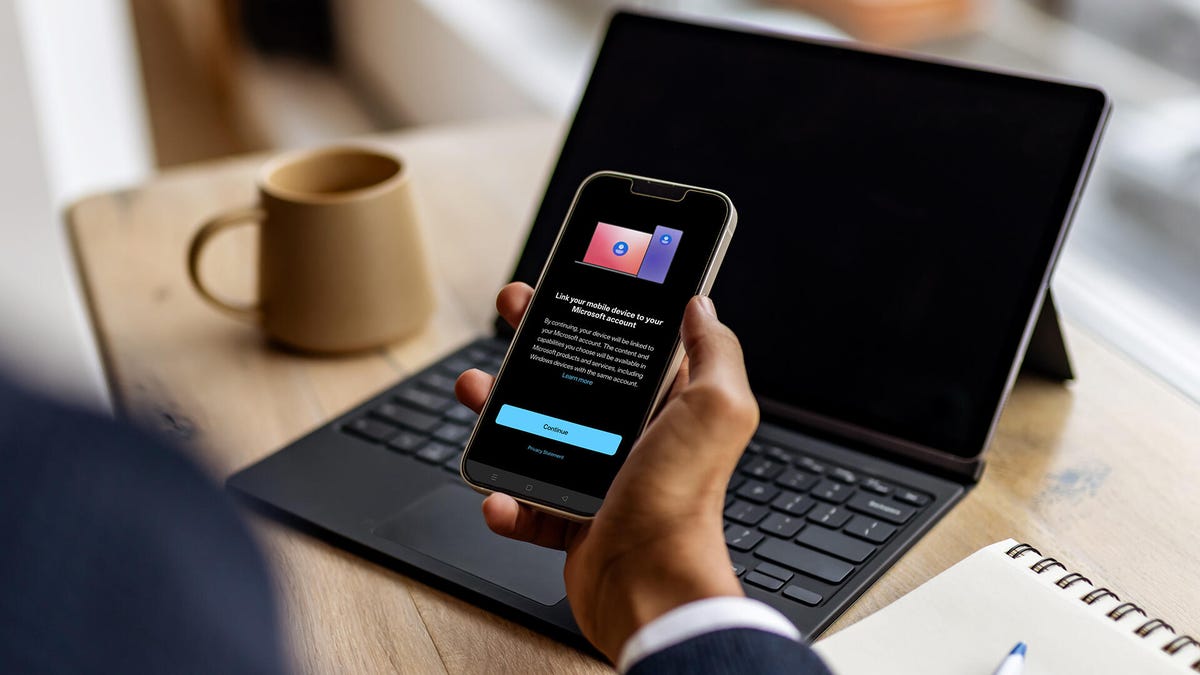
If you look at the breakdown from CNET, Phone Link is effectively a window into your mobile world that sits right on your desktop. The goal is to bridge that annoying gap between devices, allowing you to fire off texts, take calls, and even run your mobile apps without ever having to look away from your monitor. On paper, it sounds like an absolute dream for anyone obsessed with productivity. But as anyone who has actually lived with the software for more than a week can tell you, the reality is a whole lot messier than the glossy marketing materials would have you believe. It’s a tool built entirely on compromises—and depending on which phone you’re carrying in your pocket, your experience is going to vary wildly.
The core promise here is simple: stay focused on one screen. In a world where we are constantly context-switching and losing our train of thought, that’s a very seductive pitch. According to a 2024 Pew Research Center study, roughly 15% of American adults are “smartphone-only” internet users. However, for the millions of us who still find ourselves parked at a desk for eight hours a day, the friction of having to pick up a phone every single time it buzzes is a genuine productivity killer. Microsoft is well aware of this, and Phone Link is their primary play to keep you inside the Windows ecosystem for as long as humanly possible.
Why Your Experience Changes Completely Depending on What’s in Your Pocket
Now, if you happen to be an Android user, using Phone Link can honestly feel like you’ve gained a superpower. You can mirror your entire screen, drag and drop photos as if you’re just moving files between folders, and even use your phone’s high-def camera as a webcam for those marathon Teams calls. It’s deep, it’s integrated, and when everything is clicking, it genuinely feels like the future. You can interact with your apps naturally, clear out notifications, and even use a “phone finder” feature that makes your device scream from under the couch cushions. It is, quite frankly, the closest Windows has ever come to feeling like a cohesive, mobile-desktop hybrid.
But then we have the iPhone crowd. While Microsoft did finally bring iPhone support to the party a couple of years ago, it still feels very much like a “lite” version of the real thing. Sure, you get your texts—though notably not your full message history—along with your calls and basic notifications. But that’s really where the road ends. There is no screen mirroring, no app streaming, and certainly no easy way to drag photos back and forth. It’s a stark reminder that even in 2026, Apple’s walled garden is still protected by some pretty sharp concertina wire. If you’re an iPhone user, Phone Link doesn’t feel like a bridge; it feels like a very narrow, very shaky plank.
“Interoperability isn’t just a feature anymore; it’s the glue that prevents user churn in an increasingly fragmented hardware market.”
— 2025 Digital Ecosystems Report
And yet, even that “superior” Android experience has its own set of frustrating quirks. Have you ever tried to open a banking app or check your Gmail via Phone Link? Almost every single time, you’re forced to pick up your actual phone, unlock it, and manually grant permission for the screen mirroring to start. I get it—it’s a security feature—but it completely defeats the whole purpose of “not picking up your phone” in the first place. It’s these tiny, constant moments of friction that remind you that you’re ultimately juggling two entirely separate operating systems that weren’t really designed to talk to each other.
Let’s Talk About the Elephant in the Room: Your Data
We really need to have a serious conversation about permissions. When you first set up Phone Link, the app asks for access to… well, pretty much everything you own. It wants your contacts, your messages, your call logs, your photos, and even your location. That is a massive, staggering amount of personal data to hand over to a single piece of software. Now, if you’re already an Android user, you’ve probably already made your peace with Google having this information. And if you’re on Windows, Microsoft already knows plenty about you. But Phone Link is the exact point where these two massive streams of data collide, and for some people, that’s just a bridge too far.
Then there’s the “spam” problem, which is its own kind of headache. During testing, it’s been frequently noted that Phone Link has a bizarre habit of displaying spam texts that the phone itself has already successfully blocked. Imagine you’re finally in a flow state at your desk, only to have a pop-up on your PC scream at you that your “Amazon account has been suspended” (spoiler: it hasn’t). It’s an incredibly annoying oversight that suggests the integration isn’t nearly as smart as Microsoft wants us to think. If the phone is smart enough to know it’s spam, why on earth isn’t the PC?
According to Statista, Windows still maintains about 72% of the global desktop OS market as of early 2026. With that kind of market dominance, Microsoft doesn’t necessarily need Phone Link to be perfect; they just need it to be “good enough” to keep people from glancing longingly at a Mac. But for those who are genuinely privacy-conscious, the trade-off can feel incredibly lopsided. You are giving up a massive amount of personal data just for the “convenience” of not having to move your hand six inches to the left to check a text message.
It’s Not All Bad: The Little Features That Actually Save My Sanity
It’s not all just frustration and data-hoarding, though. There are some genuinely brilliant features buried inside Phone Link that make it remarkably hard to live without once you’ve actually integrated them into your routine. The “Instant Hotspot” feature, for instance, is an absolute godsend for anyone who travels. Being able to trigger your phone’s hotspot directly from your PC’s Wi-Fi menu without ever having to dig the phone out of your bag is one of those small, magical touches that actually saves meaningful time. It’s the kind of “it just works” experience that Microsoft usually struggles to nail, but here, they’ve gotten it right.
Then there’s the photo integration, which is a total game-changer for my workflow. If you’ve ever needed to quickly grab a screenshot from your phone to drop into a PowerPoint presentation or a Slack message, Phone Link makes it effortlessly easy. The feed of your most recent photos is just right there, and you can simply drag them onto your desktop. No more Discord-ing images to yourself, no more emailing files, and no more waiting for OneDrive to slowly sync in the background. For creators and office workers, this single feature might honestly be worth the entire setup process alone.
So, Is It Finally Time to Skip the Link?
So, should you actually use it? If you’re a heavy Android user who spends the vast majority of your day sitting at a PC, the answer is probably yes—but it comes with some significant caveats. You have to be comfortable with the permissions, and you have to accept the fact that the Bluetooth connection will occasionally fail for no apparent reason (because, let’s face it, Bluetooth is still Bluetooth, even in 2026). If all you really want to do is send the occasional text, you might actually be better off just using “Messages for Web” in your browser. It’s lighter, it’s cleaner, and it handles things like emoji reactions much better than Phone Link’s somewhat clunky and dated interface.
For the iPhone users out there, the calculation is very different. Unless you absolutely have to see your notifications on your desktop to avoid missing a critical call from your boss, Phone Link probably isn’t worth the hassle of the setup. The limitations imposed by Apple’s iOS make it feel like a half-baked product at best, and you’re honestly better off just keeping your phone on a nice charging stand right next to your monitor.
Does Phone Link work without Wi-Fi?
Surprisingly, yes. You can actually use your phone’s cellular data for remote access if you aren’t on the same Wi-Fi network. This is a great fallback if you accidentally leave your phone in the car or in another room, though you should expect it to be noticeably slower than a local connection.
Can I run multiple apps at once?
If you’re using certain high-end Samsung devices or a Surface Duo, you can actually open multiple mobile apps in separate windows on your PC. It’s pretty slick. However, for the vast majority of other Android phones, you’re still limited to mirroring just one screen at a time.
Is my data actually secure?
Microsoft maintains that the connection is fully encrypted, but the app still requires an extensive, almost invasive list of permissions to function. If you are sensitive about your call logs and private messages being synced to a cloud-connected PC, you should definitely review those settings very carefully before you enable everything.
Is the Convenience Worth the Clutter?
Ultimately, Phone Link is a symptom of our modern, complicated relationship with technology. We have become so tethered to our mobile devices that we feel a physical itch when they aren’t within arm’s reach. Microsoft is simply trying to scratch that itch. It’s a powerful, flawed, and occasionally intrusive tool that represents both the best and the worst of modern device interoperability. It hasn’t quite reached the seamless, invisible feel of the Apple ecosystem just yet, but for the millions of us who live in that messy cross-section of Windows and Android, it’s easily the best bridge we’ve got.
Just don’t be surprised if you find yourself occasionally turning it off just to get some actual peace and quiet. Sometimes, the best form of “interoperability” isn’t a piece of software—it’s just putting your phone in a desk drawer and closing the lid on your laptop for a while.
This article is sourced from various news outlets. Analysis and presentation represent our editorial perspective.